
Automate what happens after submit.
Visual workflows for forms, surveys, funnels, and booking pages - notify Slack, send webhooks, route VIP leads, delay follow-up, and replay failed runs.
- Visual builder
- Cross-product triggers
- Integrations
- Run history
- Replay
Everything you need, nothing you don't.
Automate what happens after submit. Built for the way you actually work, with no setup headaches and no surprises.
Visual builder
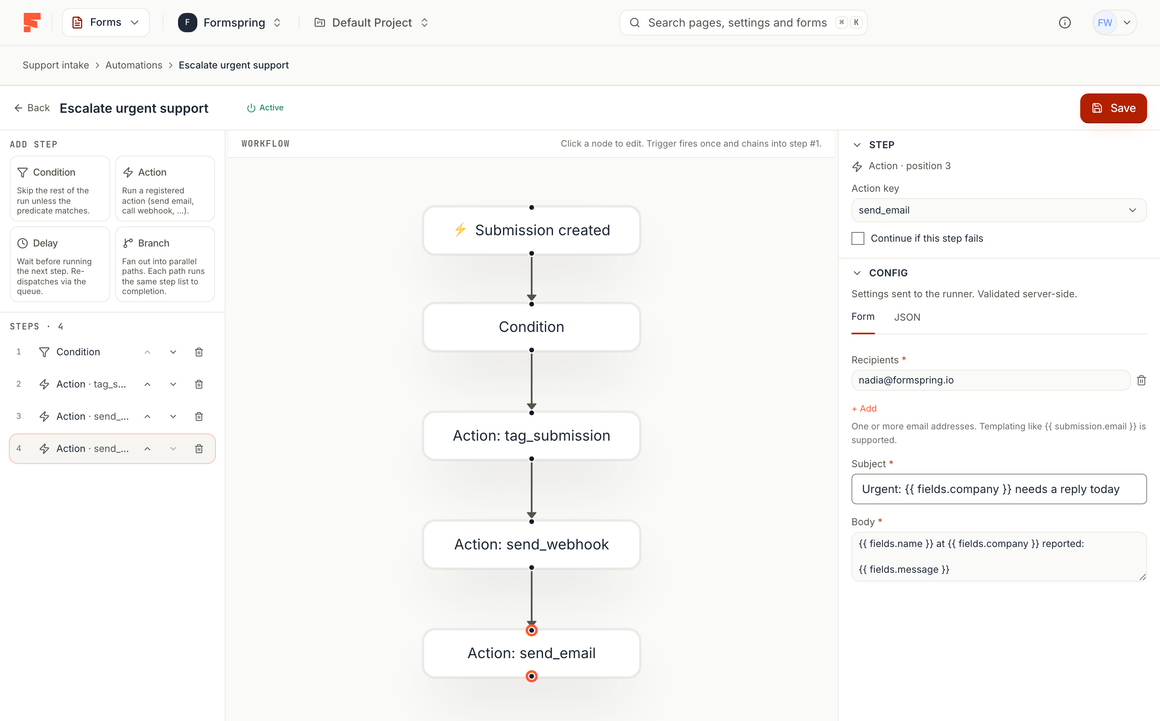
Wire triggers, conditions, and actions without leaving the dashboard.
Cross-product
One rule system for forms, surveys, funnels, and booking pages.
Integrations
Slack, email, webhooks, and connected tools as actions.
Run history
See what fired, what failed, and why.
Replay
Retry failed deliveries without re-submitting the original answer.
How it works
Build it. Share it. Watch it land.
- Step 1
Pick a trigger
New submission, score threshold, tag, or schedule.
- Step 2
Add conditions
Only run when the answer matches your rules.
- Step 3
Fire actions
Notify, update, integrate, or delay the next step.
About Automations.
What are Formspring Automations?
How many automations can I run?
Your next automation is three minutes away.
Pick a template, make it yours, and share it today. Every plan includes its submissions with no per-response overage fees.
No card needed. 50 submissions a month on the free plan.